Exact2Pass

Last Update 22 hours ago Total Questions : 348
The UiPath Advanced RPA Developer v1.0 Exam (UiARD) content is now fully updated, with all current exam questions added 22 hours ago. Deciding to include UiPath-ARDv1 practice exam questions in your study plan goes far beyond basic test preparation.
You'll find that our UiPath-ARDv1 exam questions frequently feature detailed scenarios and practical problem-solving exercises that directly mirror industry challenges. Engaging with these UiPath-ARDv1 sample sets allows you to effectively manage your time and pace yourself, giving you the ability to finish any UiPath Advanced RPA Developer v1.0 Exam (UiARD) practice test comfortably within the allotted time.
In which situation can " idx " be used in a reliable selector?
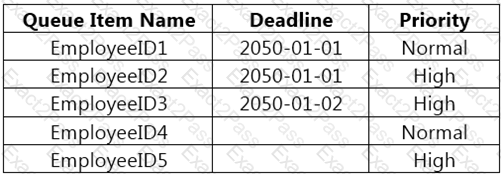
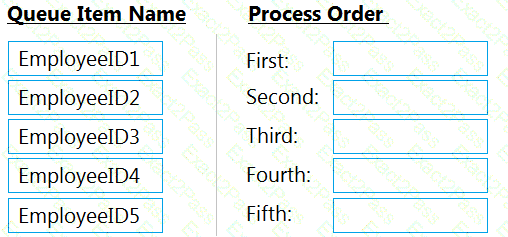
Based on the exhibit that represents the " Deadline " in the yyyy-mm-dd format, what is the correct sequence in which the Queue Items are processed by a single Performer workflow?
NOTE: Drag the Queue Item Name found on the “Le ft” and drop on the correct Process Order found on the “Right”
A developer is working on an automation. The automated process must log into Citrix and click on the " Generate Shipment Details " button. Ideally, this generates a table of shipping records. If the generated table displays only the header row and no data is available, then it should be marked as an exception since the data is incomplete.
What is this type of exception?
You want to identify a selector for a button in an application. The selector will be used as the target in a Click activity.
In order to ensure the Click activity executes as intended, how many elements should the selector be valid for at runtime?
A developer is creating an automation project which processes personal information of employees.
To protect sensitive information that is logged during the execution of the automation at the Verbose level, how can the developer avoid logging variable and argument values in both Orchestrator and Studio?
A developer creates a Dispatcher which extracts information from the top 30 mail messages in Microsoft Outlook and uploads that information into a queue.
What is the recommended way to avoid processing duplicates of the same Queue Items?
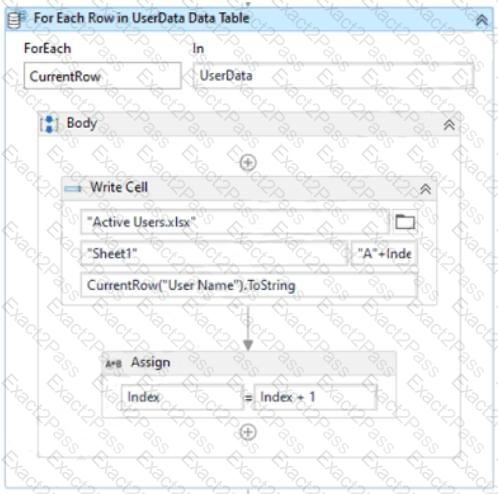
A developer has created the following sequence:
The Write Cell activity has the following properties:
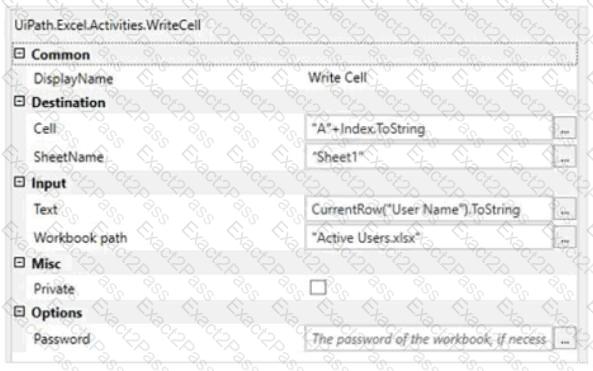
What is the behavior of the sequence once executed?



 Text
Description automatically generated
Text
Description automatically generated